A free Mechanic account connected to a Rider Pro user, access to the motorcycle and permission to create setups. Keep the existing configuration available if you want to compare it. Pulse is not required.
Create the proposed configuration
- Open Shared Garage → Setups and choose the rider’s motorcycle. Review the existing configuration you are starting from. Check the bike and setup name so the proposal is based on the version you mean.
- Open the new-setup form for that motorcycle. Give the configuration a name that distinguishes it from the existing one, such as the event and the change being considered. Keep the earlier setup intact so it remains available for comparison.
- Enter the proposed settings and explain the change in the notes. Include the unchanged values needed to describe the whole configuration, not just the adjustment you are discussing. Note the purpose of the proposal and any conditions it is intended for, so the rider has the context when reviewing it later.
- Save the new setup, then reopen it. Check the motorcycle, name, settings and notes. Make sure the new version exists separately from the configuration you started with.
Review the differences with the rider
Select the existing configuration and the new one for comparison. The comparison accepts up to four setups; two are enough to review a single proposal. Enable Highlight Differences to see which values changed, then read the notes alongside those values.
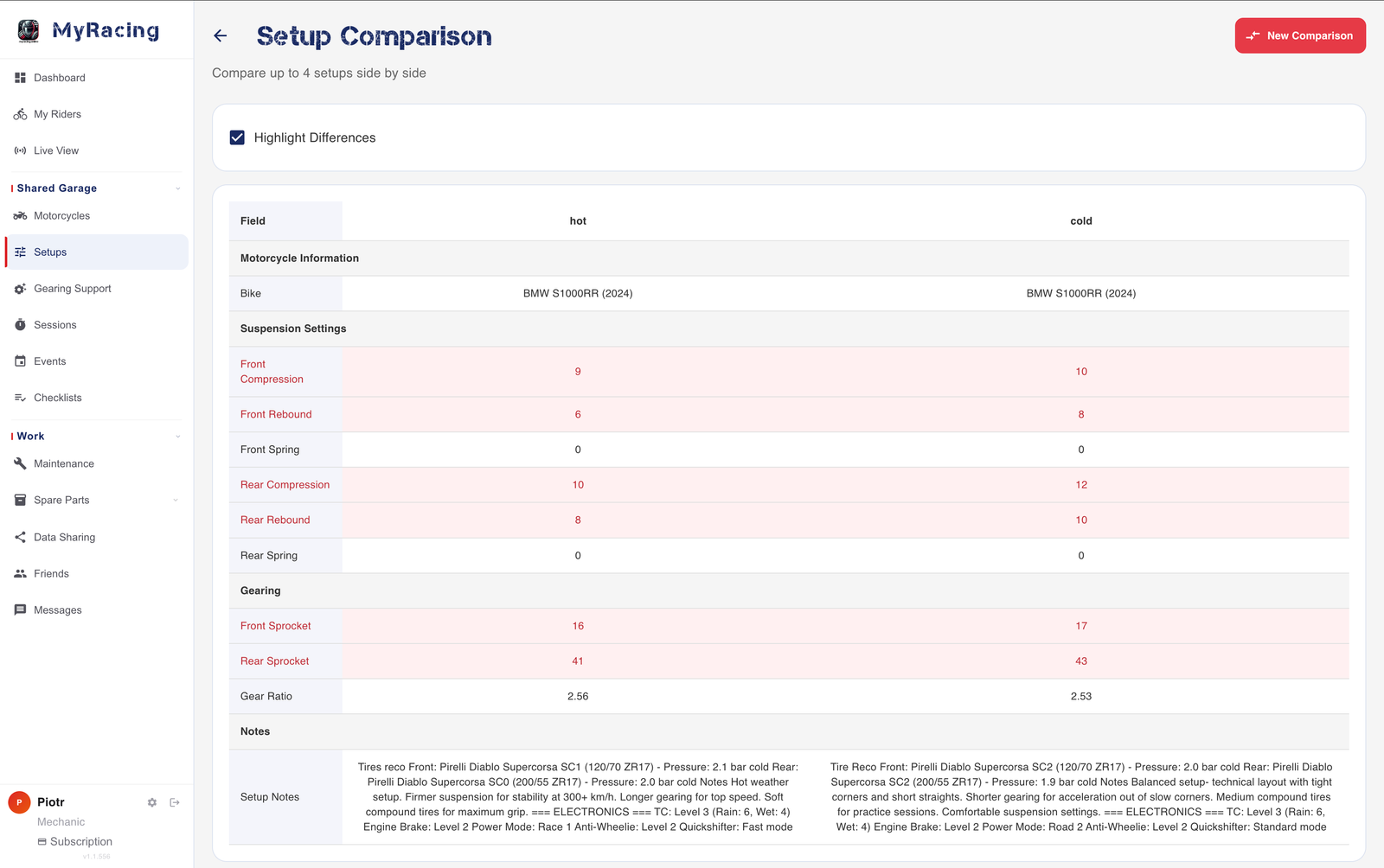
Ask the rider to open the proposed setup in their account and confirm its name. Use the comparison to agree which version they intend to try. A saved proposal describes an option; the setup associated with the later session should reflect what was actually used on the motorcycle.
The task is complete when the proposed configuration is saved, the original is still available and the rider can identify the version being discussed. The setup-history article explains why keeping the eventual configuration with its session matters.
If you cannot create or find the setup
Viewing existing setups does not establish permission to create one. Ask the rider to check the motorcycle and setup permissions in Data Sharing. If the proposal is missing, first confirm the selected rider and motorcycle, then check whether the save completed before creating it again.