Everything about your racing,
in one place.

Plan your riding, keep your motorcycle’s history and review each session with the data behind it.
Get started Check Pulse iOS · Android · Web · one account
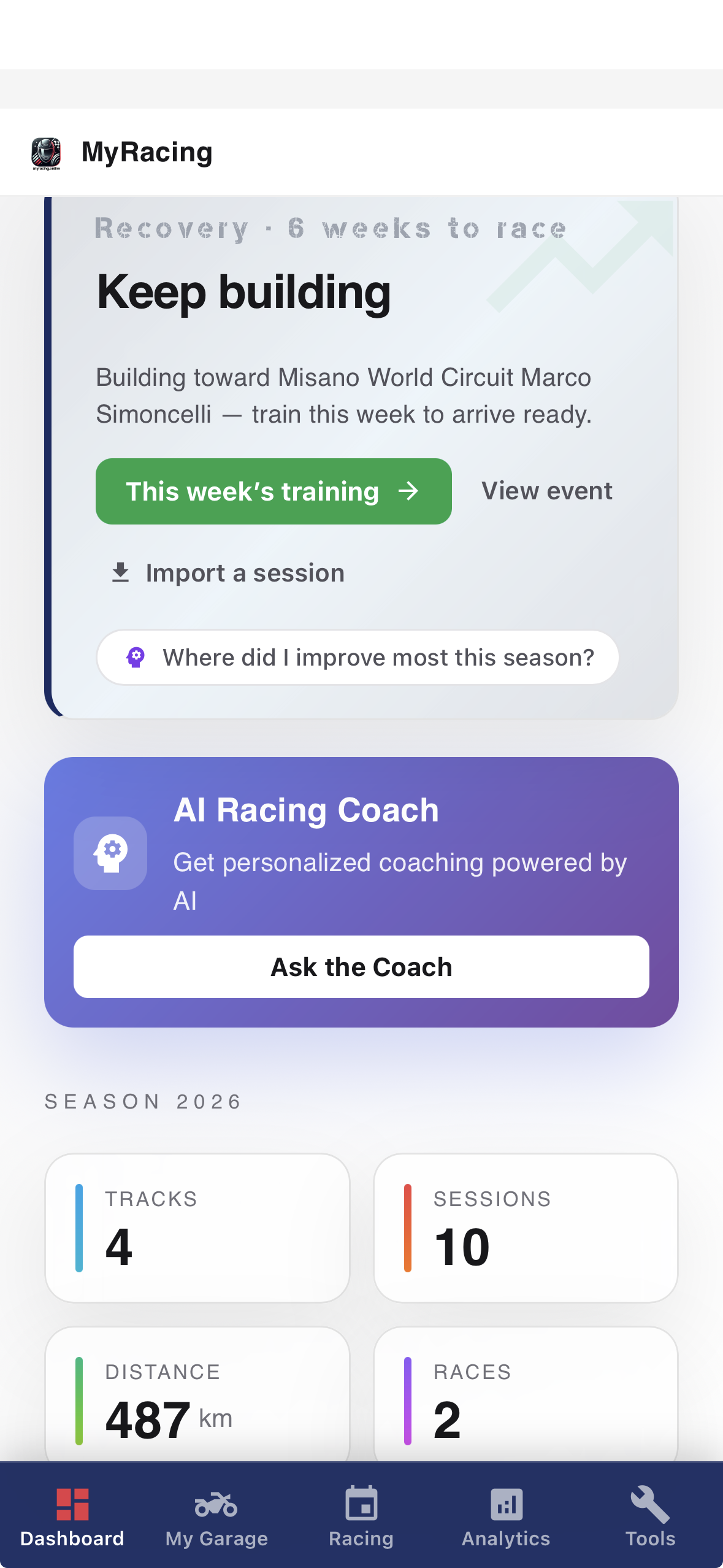
MyRacing mobile dashboard
MyRacing

Explore MyRacing

Plan your season and review your riding on the platform. Add Pulse to record telemetry on the bike.

MyRacing Platform

Run your whole racing operation.

Rider Free
Your garage, tracks, sessions, track days and events, kept together.
Rider Pro
Analyse your sessions and telemetry, prepare for events with AI Racing Coach and Race Ready, and work with your mechanic.
Mechanic
Run the workshop: spare parts, maintenance and the riders you look after.
Web · iOS · Android
Explore the platform ↓

Pulse Telemetry

Turn every lap into answers.

Pulse free app
Your live pit board and telemetry recorder while you ride. It records the bike’s telemetry and, with a paired sensor, your heart rate.
Powered by Rider Pro
Your Rider Pro plan reads and explains: racing line, corner data, braking points, session and lap comparisons, recommendations and more.
Recorder: iOS · Android
Explore Pulse Telemetry →
MyRacing platform
Rider Pro Plan

The full experience.

Everything the platform can do for your riding, in one plan.
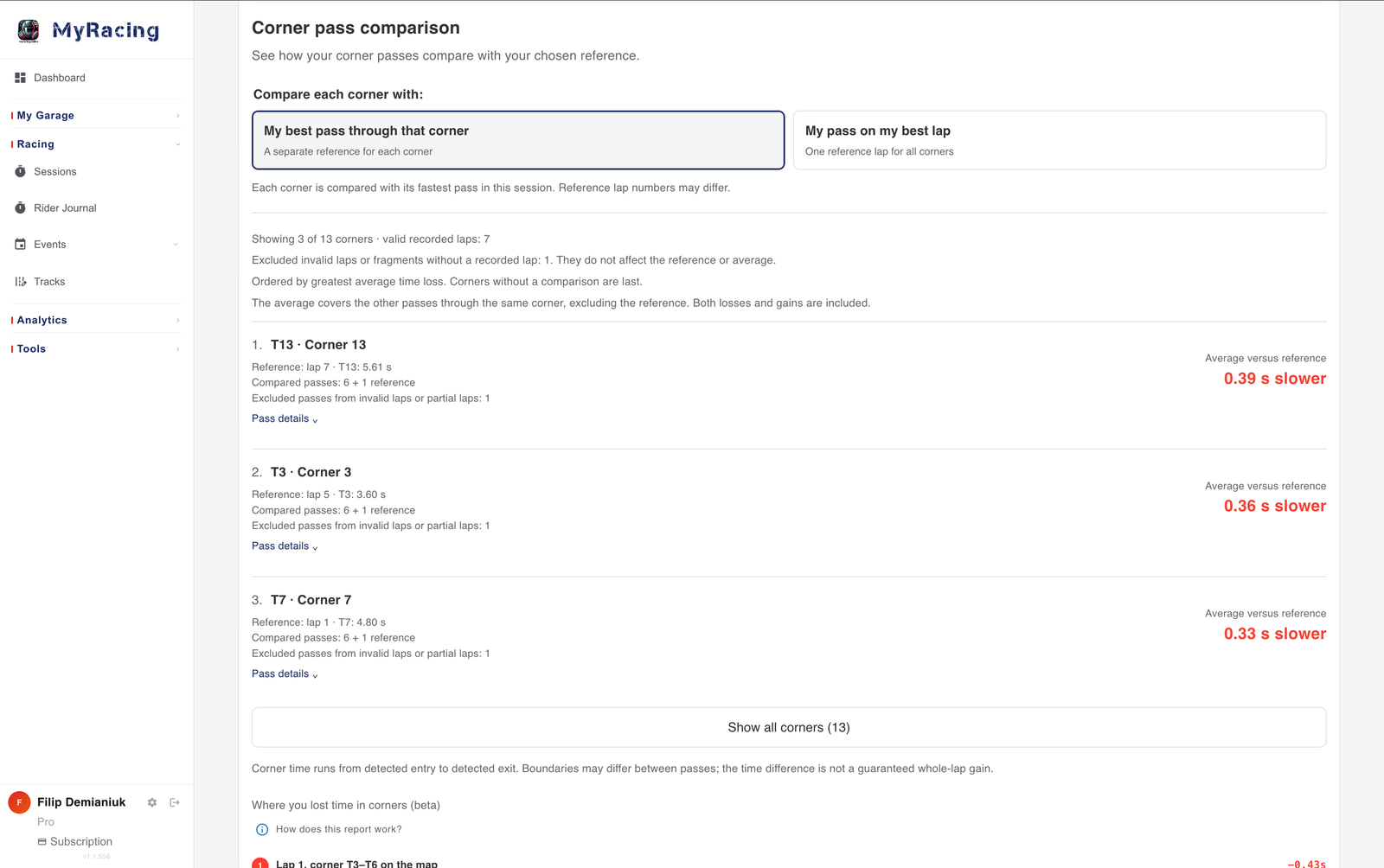
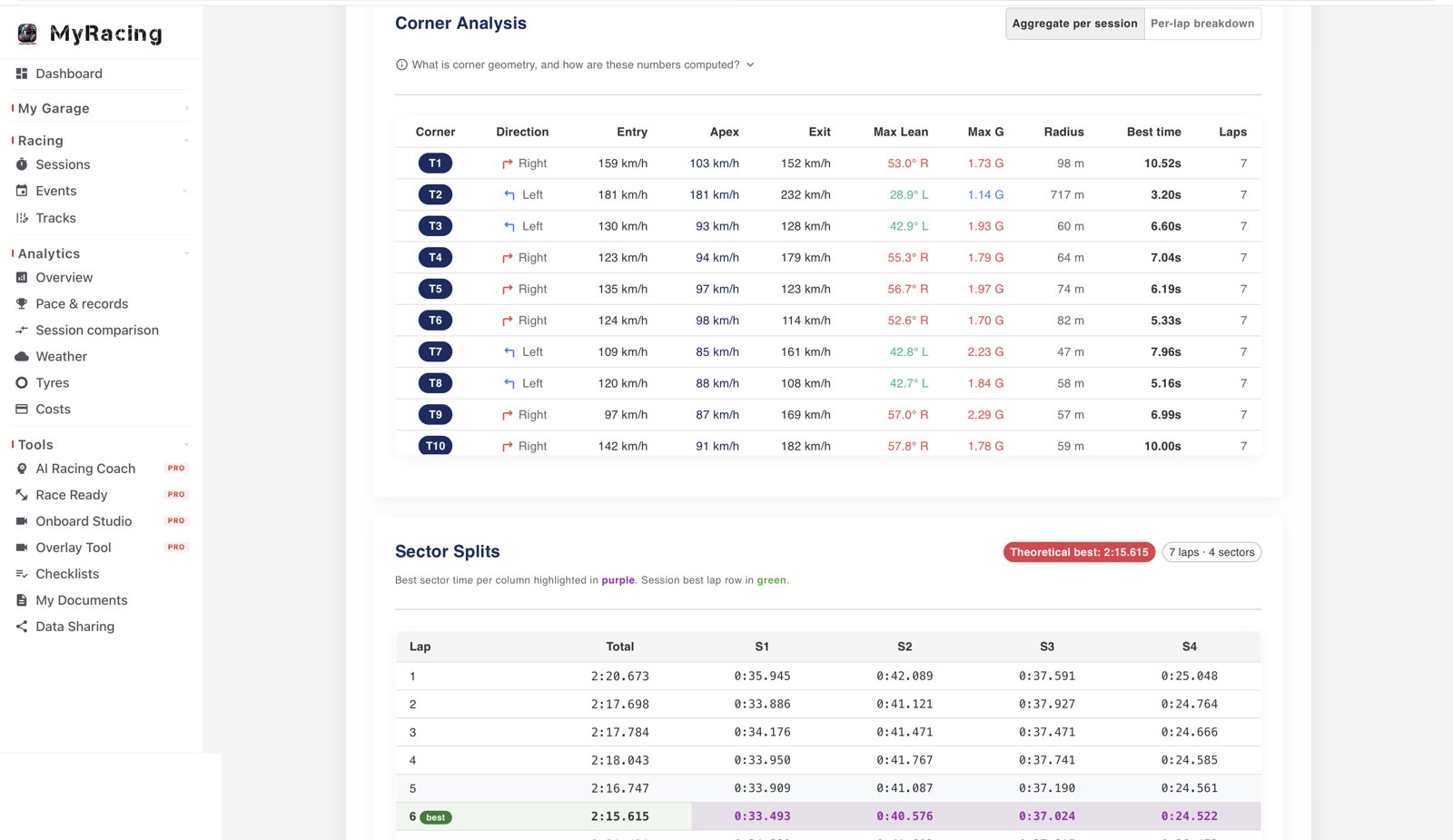
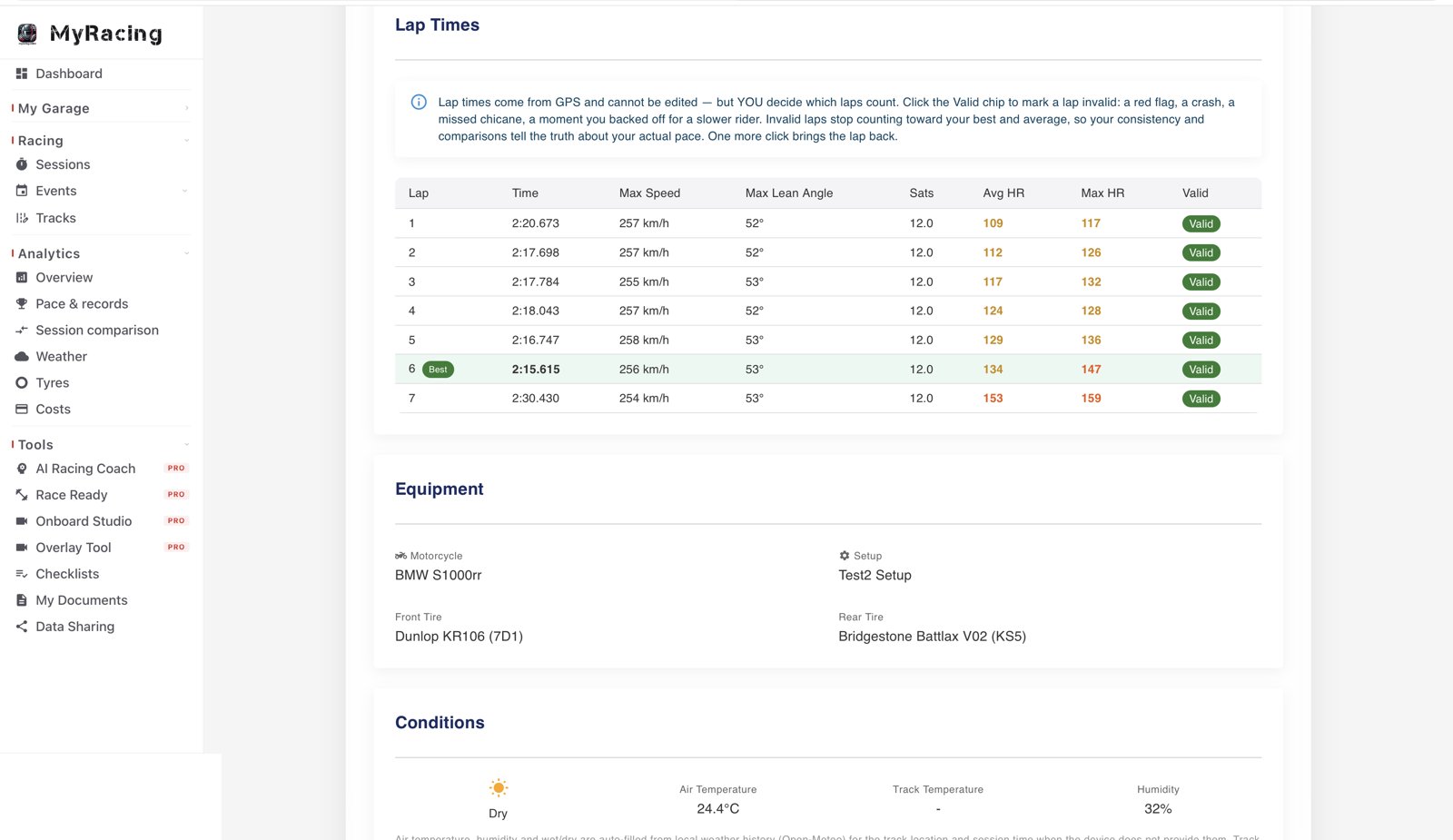
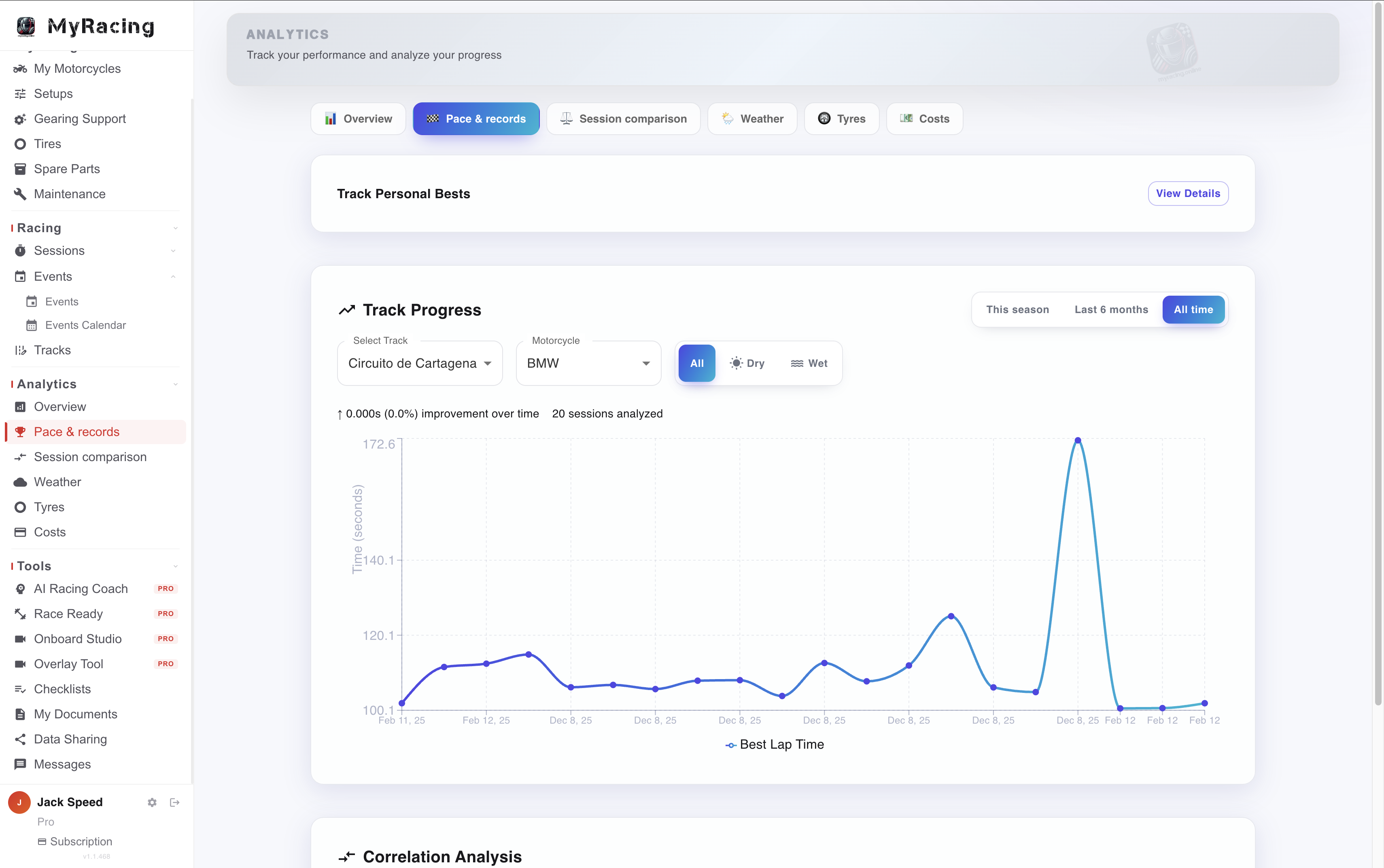
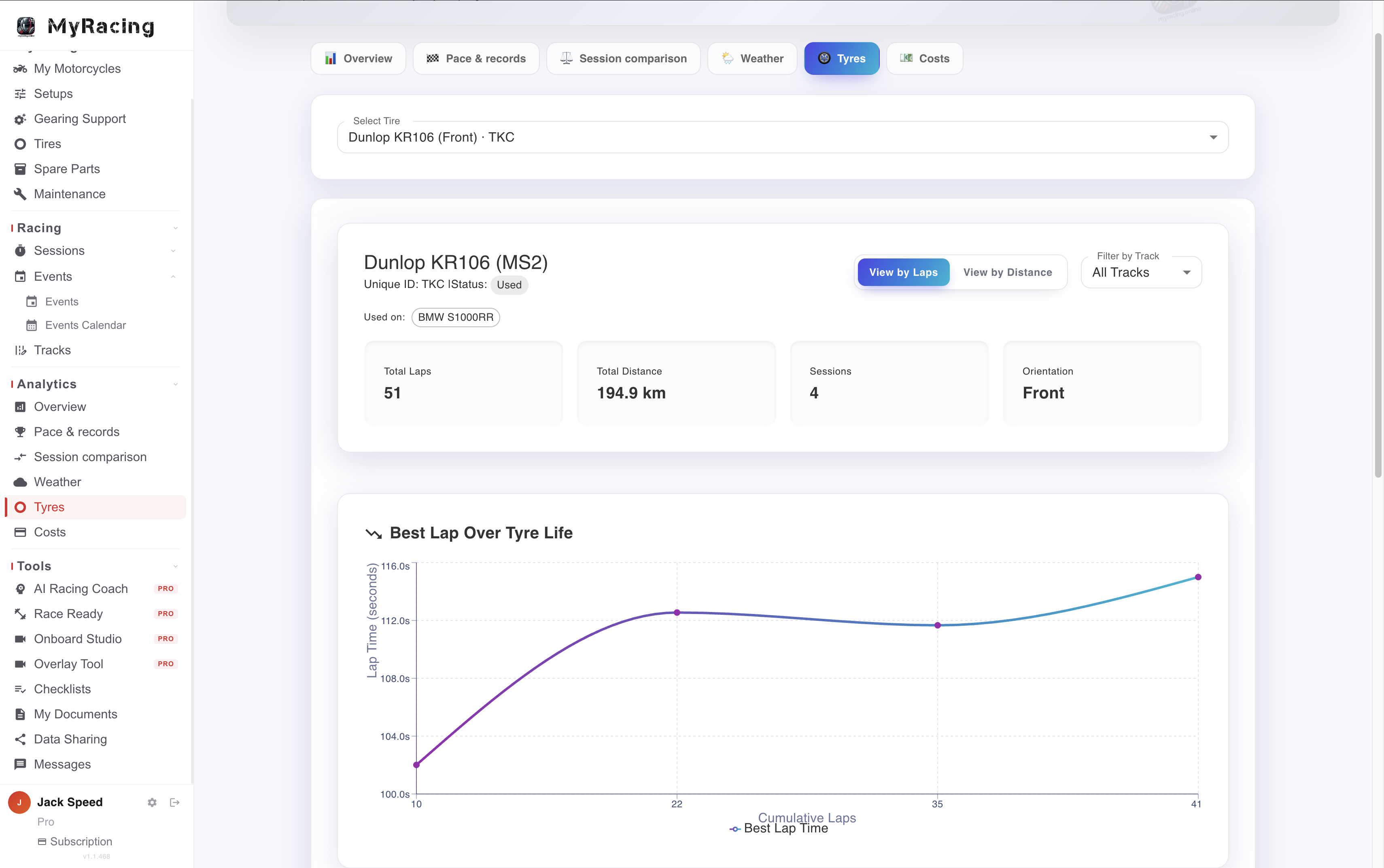
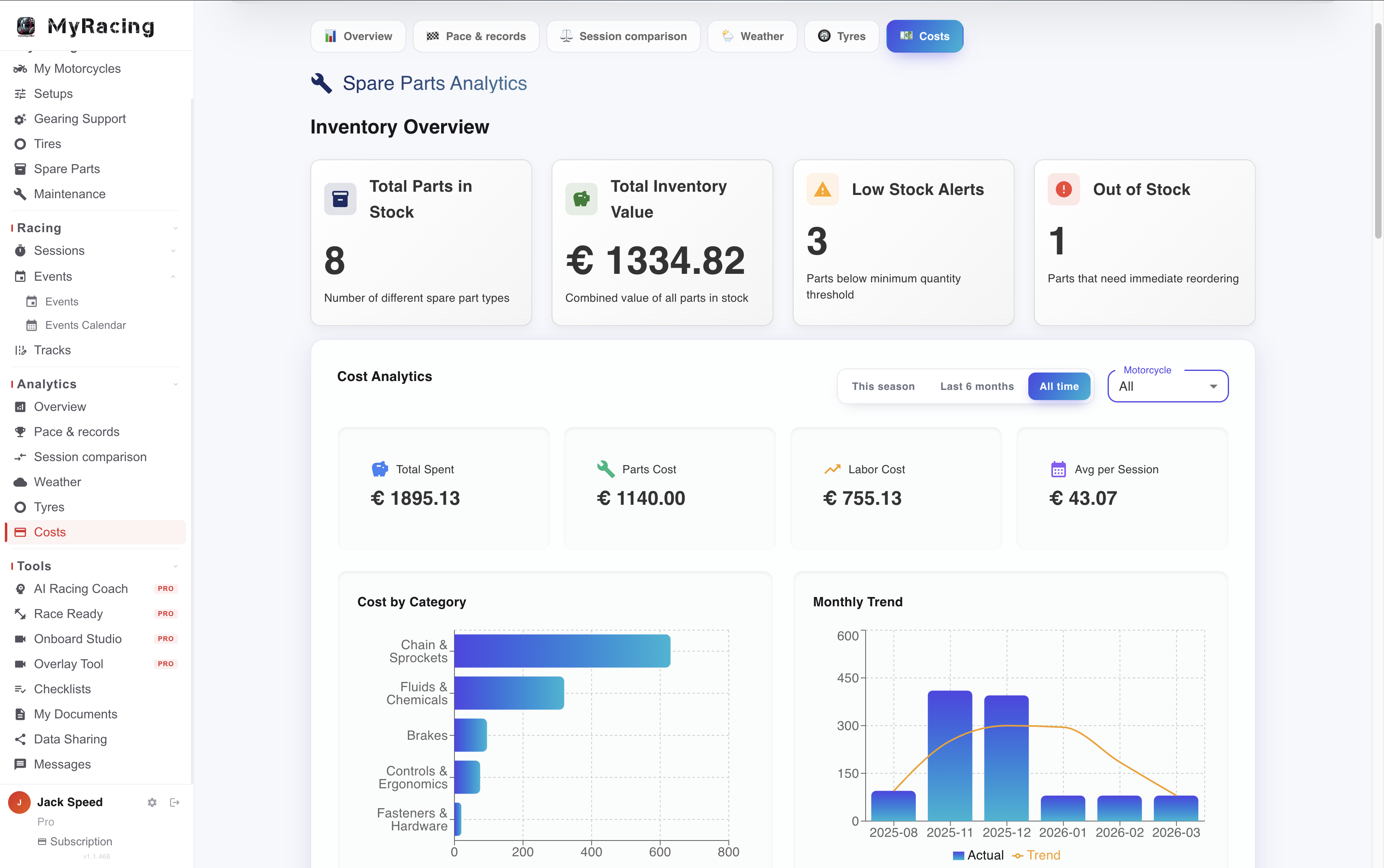
Corner pass comparison with a separate best-pass reference for each corner. Corner analysis and sector splits in MyRacing Pro Lap times, equipment and conditions in MyRacing Pro Analytics — pace Analytics — tyres Analytics — costs
PRO
Analytics

Analytics connects the sessions you have logged across your season. Review pace, track records, tyres, weather and costs; with Pulse recordings, you can also investigate individual laps and the passages where their times differ.

Pace across your season. Follow personal bests by track, compare sessions and examine how your times vary with temperature and wet or dry conditions.

The history of each tyre. Review its recorded laps, distance, session times and cost across its life, with the conditions that help put a change in pace in context.

Costs and stock. Track spending on parts and maintenance, review usage and check projected needs before an upcoming event.

PULSEON SESSIONS RECORDED WITH MYRACING PULSE

Use the recorded session to find where lap times differ, then examine the line and data around those passages.

Lap 9, corner T15–T17 on the map−0.62s

you rolled the throttle off mid-corner while holding 48° lean, then opened it again — on your best ride you kept it open here · slowest point 94 km/h

Corner comparisons. Compare each marked corner with its best pass in the session, or use the pass from your best complete lap as the reference. Review the individual passes and the average difference to choose what to examine.

Session observations. The beta report describes recorded differences through automatically detected sections, including repeated throttle roll-offs or extra slowing, against your own best pass through the section.

Repeated differences. The section-by-lap table helps show whether a loss occurs once or recurs over several attempts. Use it to find the recordings you want to discuss or revisit.

Review the ride around the result. Replay the line with recorded channels, examine braking repeatability and corner readings, or compare two to four own or shared telemetry laps. Sector splits and a calculated theoretical best add the timing context.

See the whole telemetry system on the Pulse page →

PRO
AI Racing Coach

AI Racing Coach lets you discuss your motorcycle, sessions and preparation using the relevant information logged in MyRacing. Ask about your history at a circuit, a setup for an upcoming event or your training plan. Its responses bring the selected context into the discussion, with recommendations to assess against your equipment and riding conditions.

Eight areas of your riding. Ask about motorcycles, setups, tyres, sessions, tracks, events, progress and training.

Available where you are working. Open a discussion from the garage, an event, training or analytics, with the relevant context selected.

Based on your records. The selected context gives the Coach information from your account to use alongside technical guidance. Check recommendations against the motorcycle’s specifications and actual conditions.

All your conversations are stored if you need them later and can be held in English, Spanish, German or Polish.
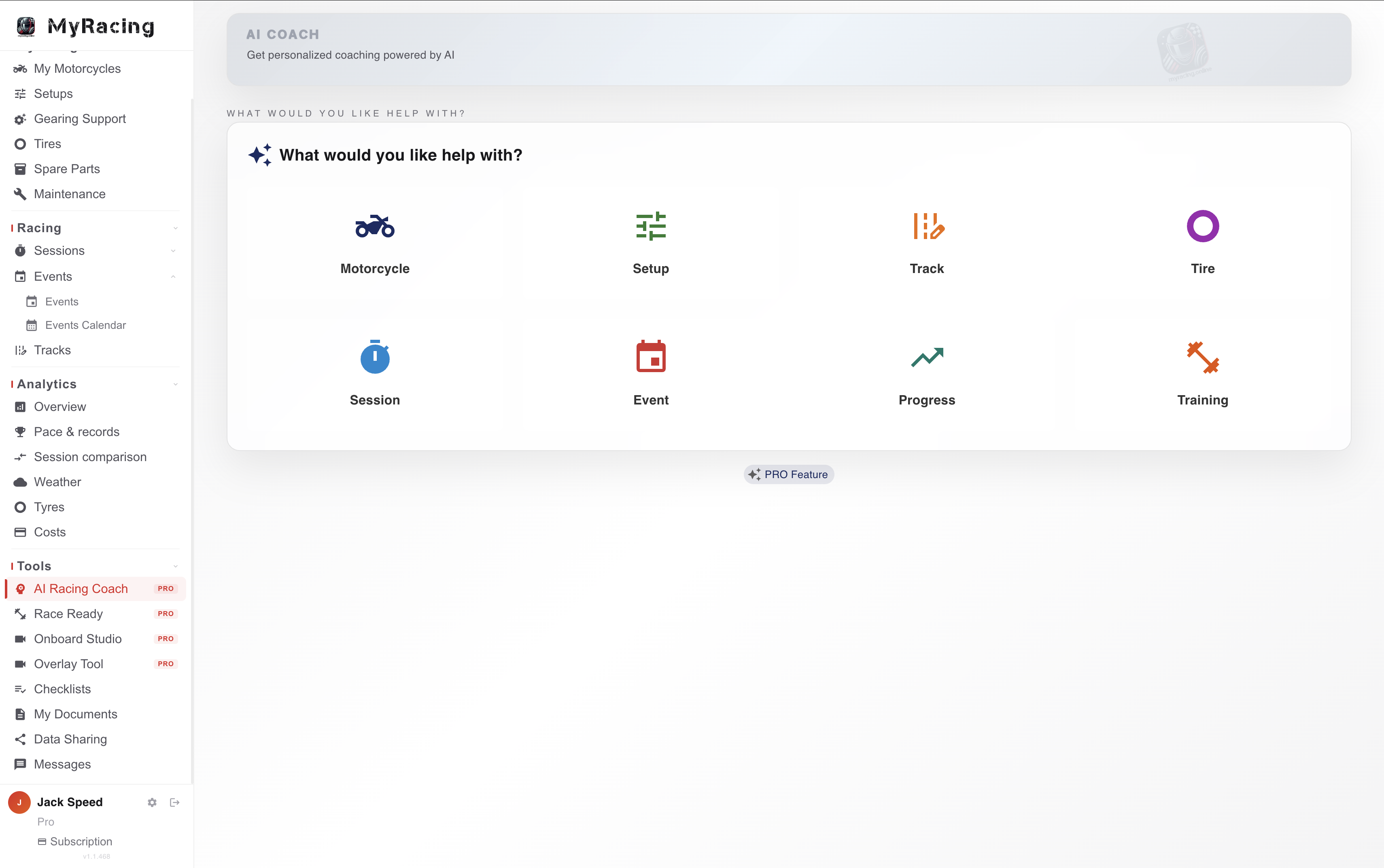
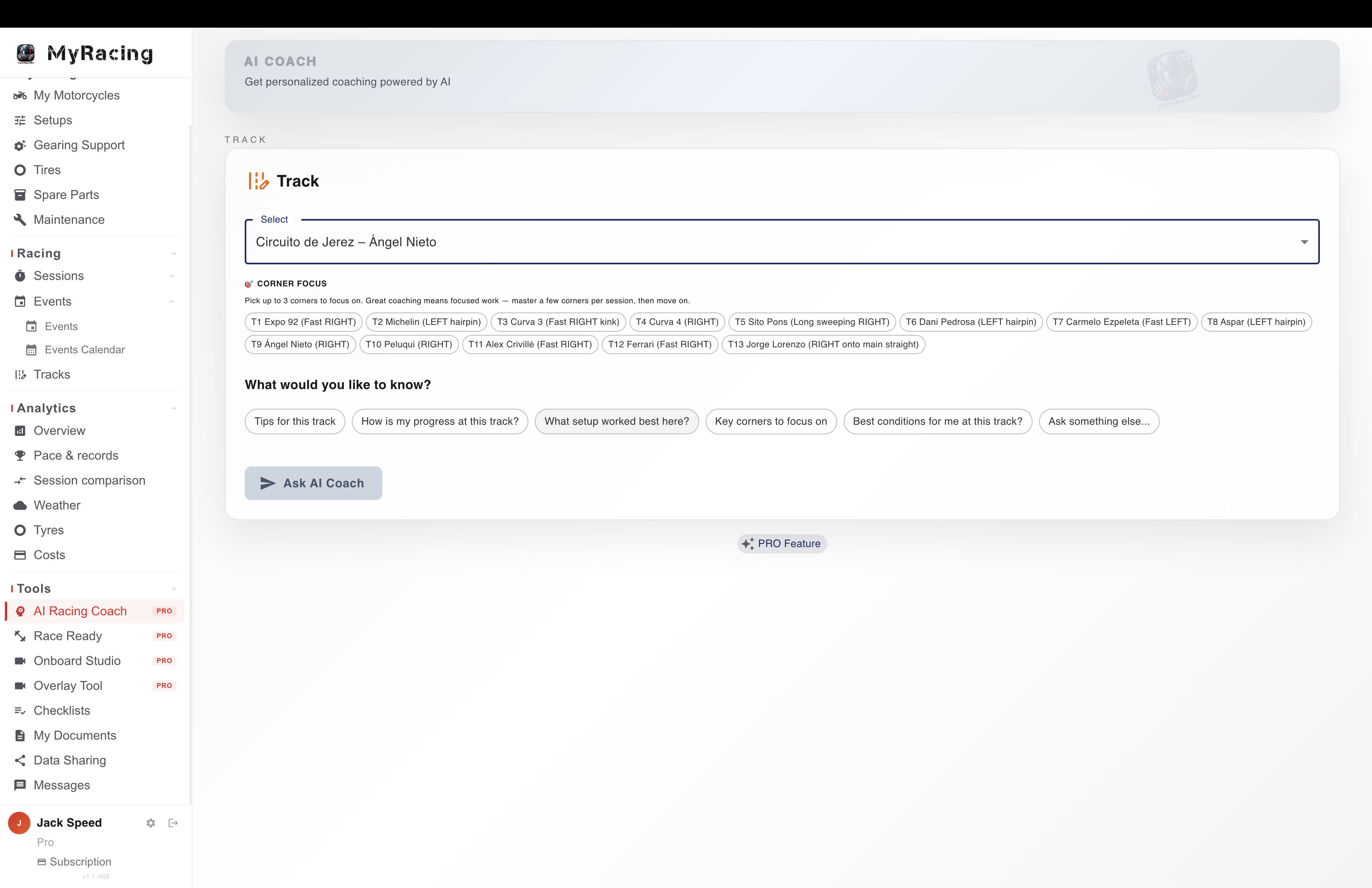
AI Racing Coach — eight themes AI Racing Coach — in context
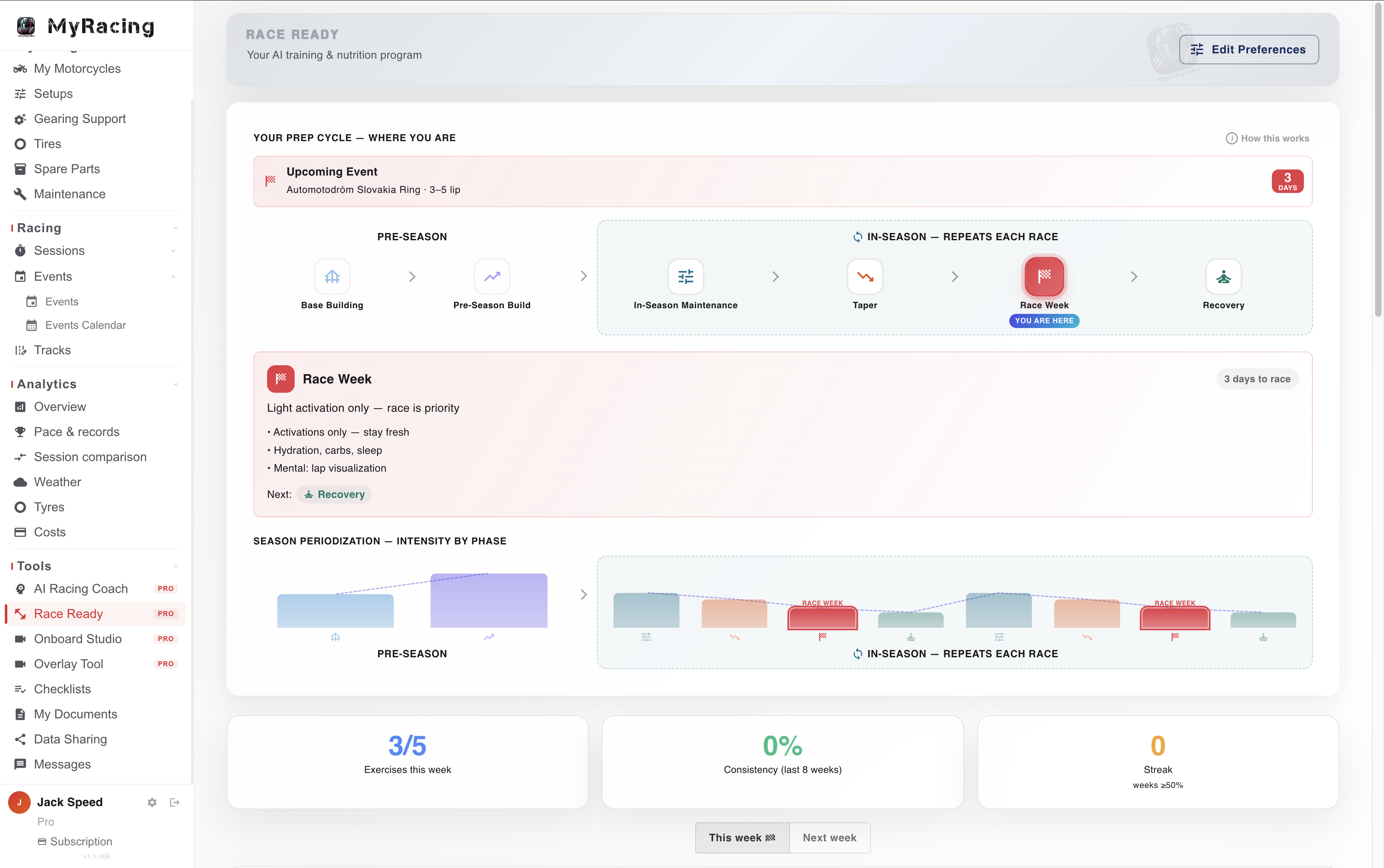
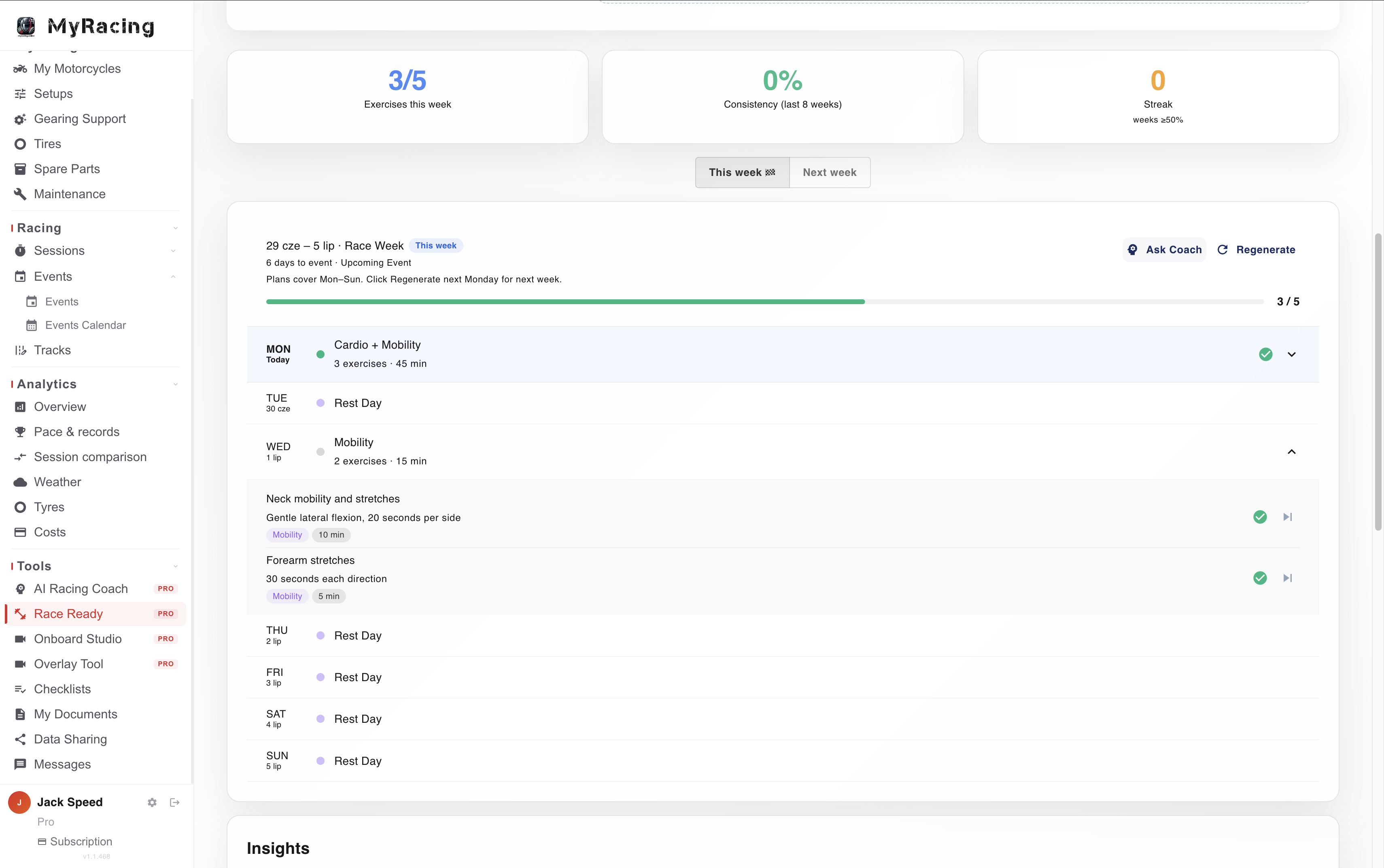
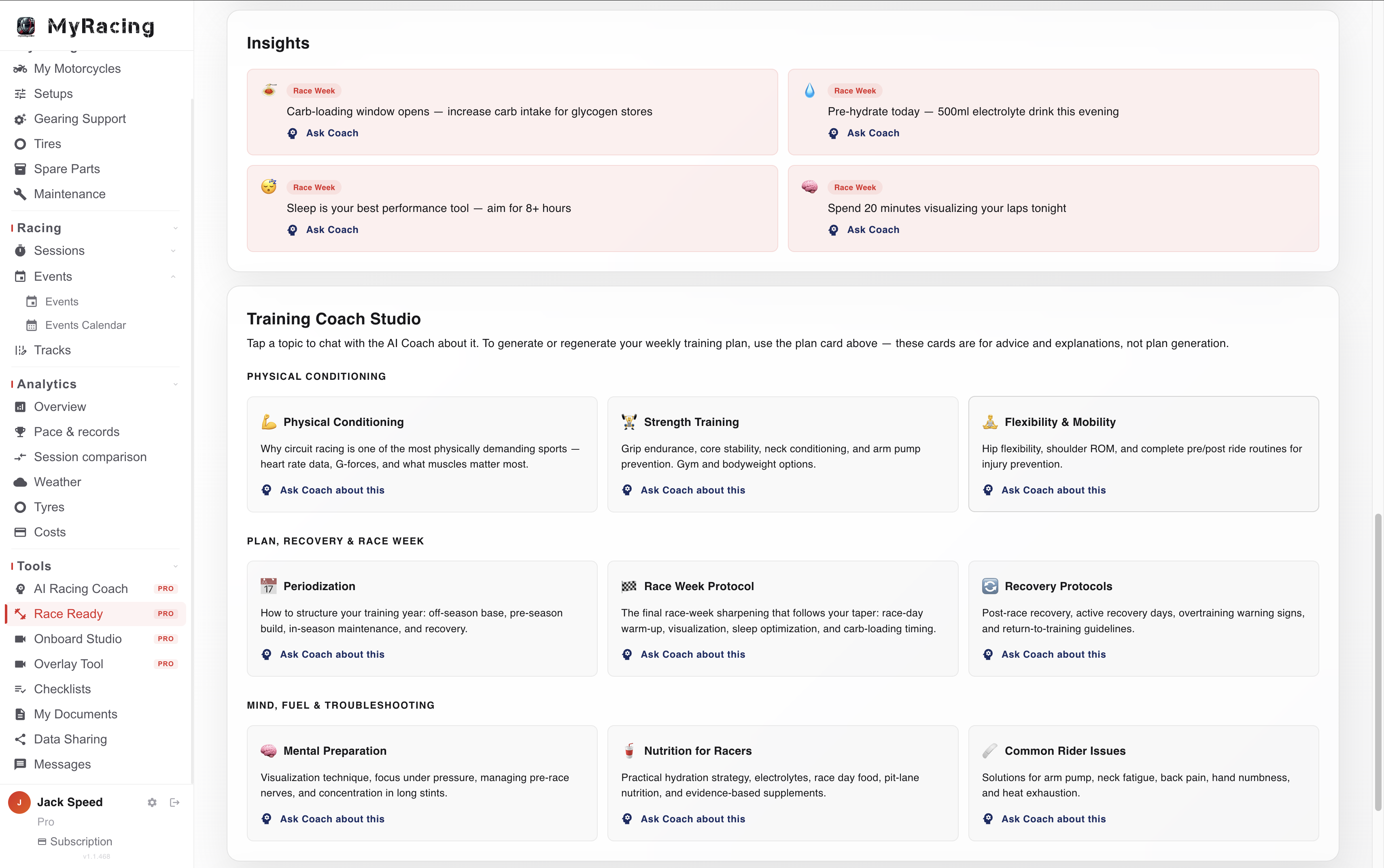
Race Ready — phase view Race Ready — weekly plan Race Ready — knowledge base
PRO
Race Ready NEW

Training, nutrition and race-week prep that follow your race calendar. Personal because MyRacing already holds your bikes, tracks and events.

Preparation across the season. Race Ready organises training through base, build, in-season, taper, race week and recovery phases around your race calendar.

Training plan. Race Ready generates your personalised week's training plan Mon to Sun.

Topics to discuss with Training Coach. Conditioning, strength, mobility, nutrition, mental preparation and recovery can be explored alongside your plan.

PRO

Work with your mechanic

Your mechanic has a free workspace with their own parts inventory. Share selected motorcycles, setups and sessions, and give permission to record maintenance or prepare a setup.

See the Mechanic plan →

Plus everything unlimited: bikes, setups, tyres, spare parts and sessions.

Get started

From garage
to grid.

Your garage and session records stay connected to the tracks and events you ride. Rider Pro adds analysis and Coach support when you want to examine that history or prepare for the next outing.
Events — at the track
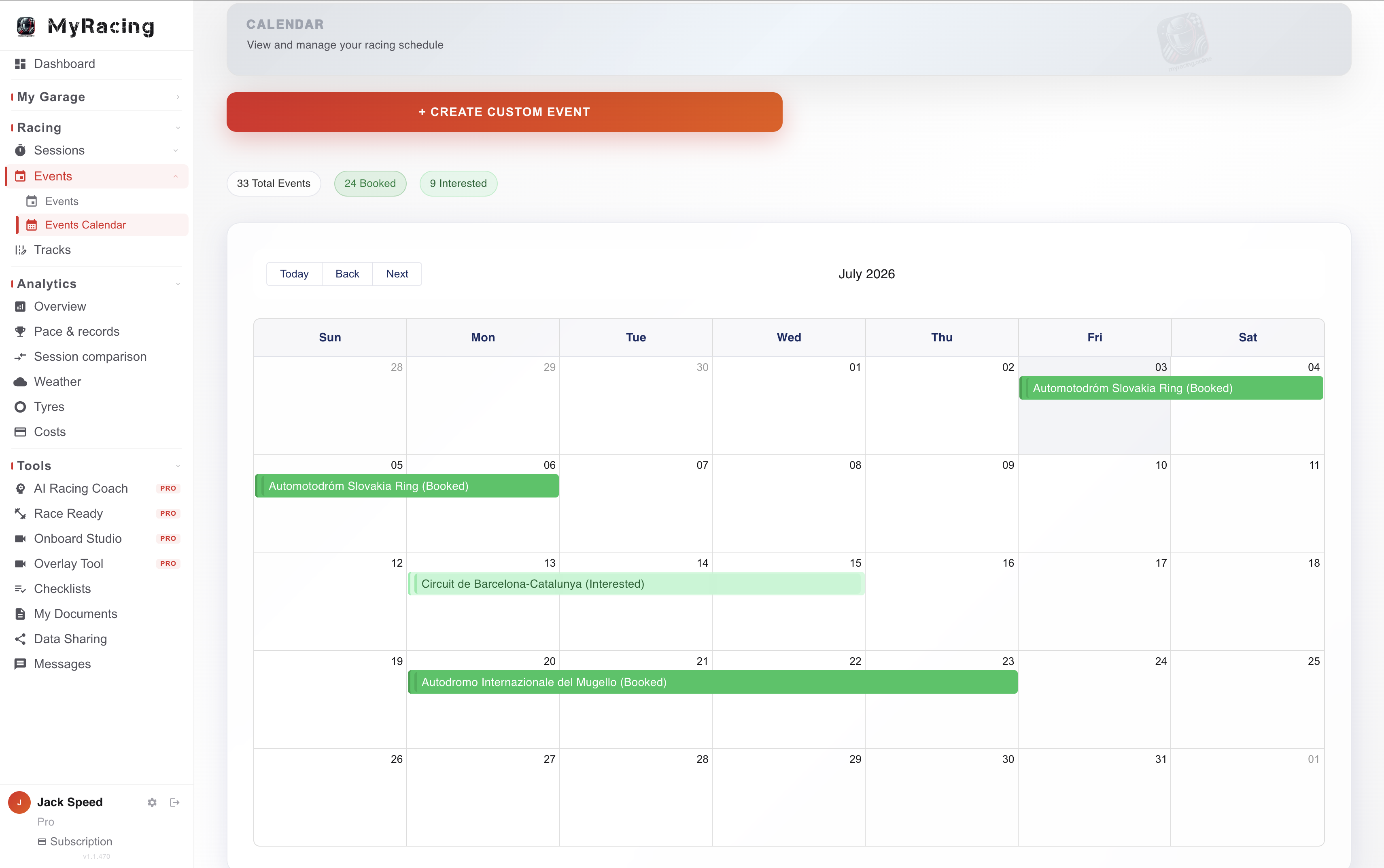
Events — calendar
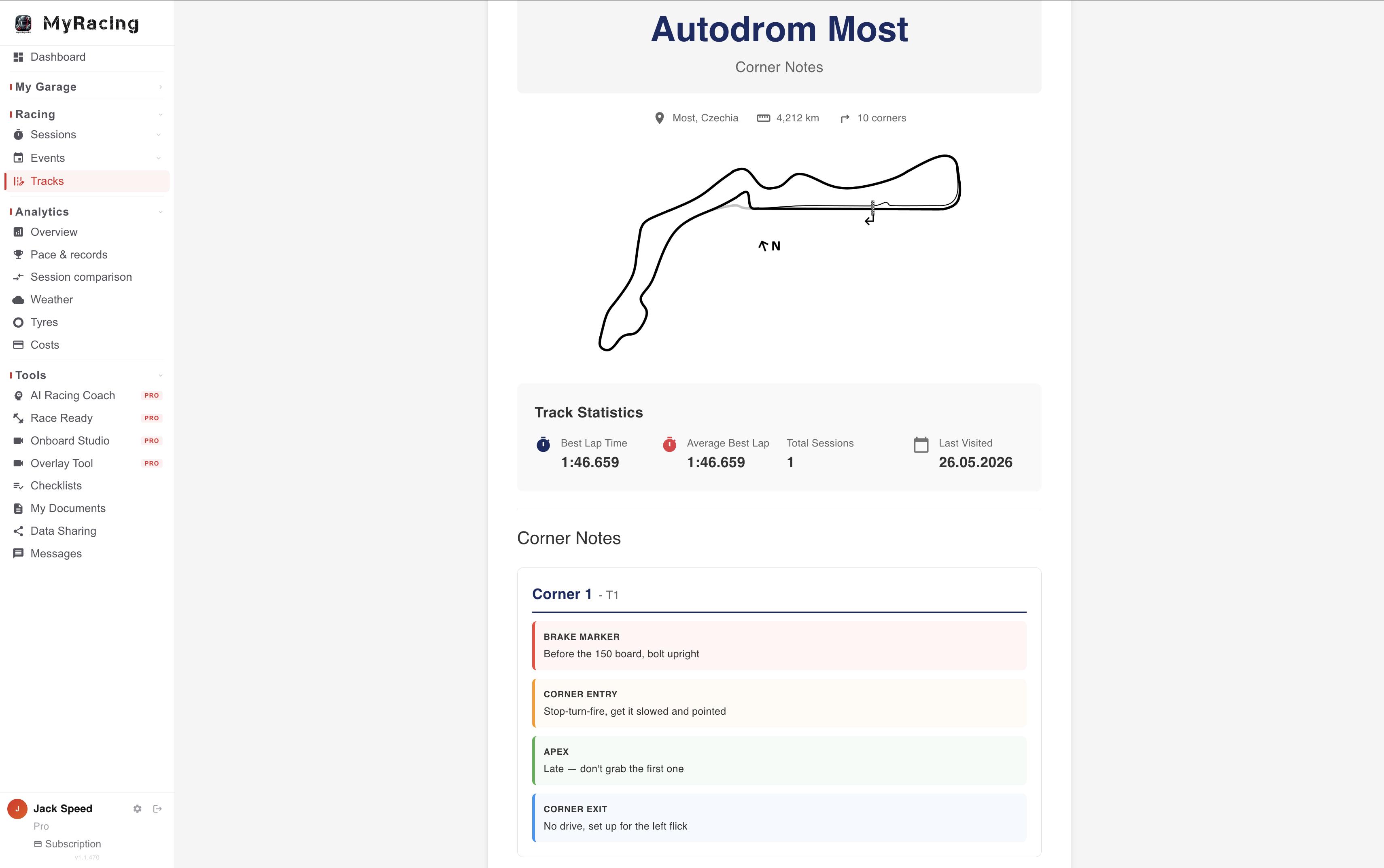
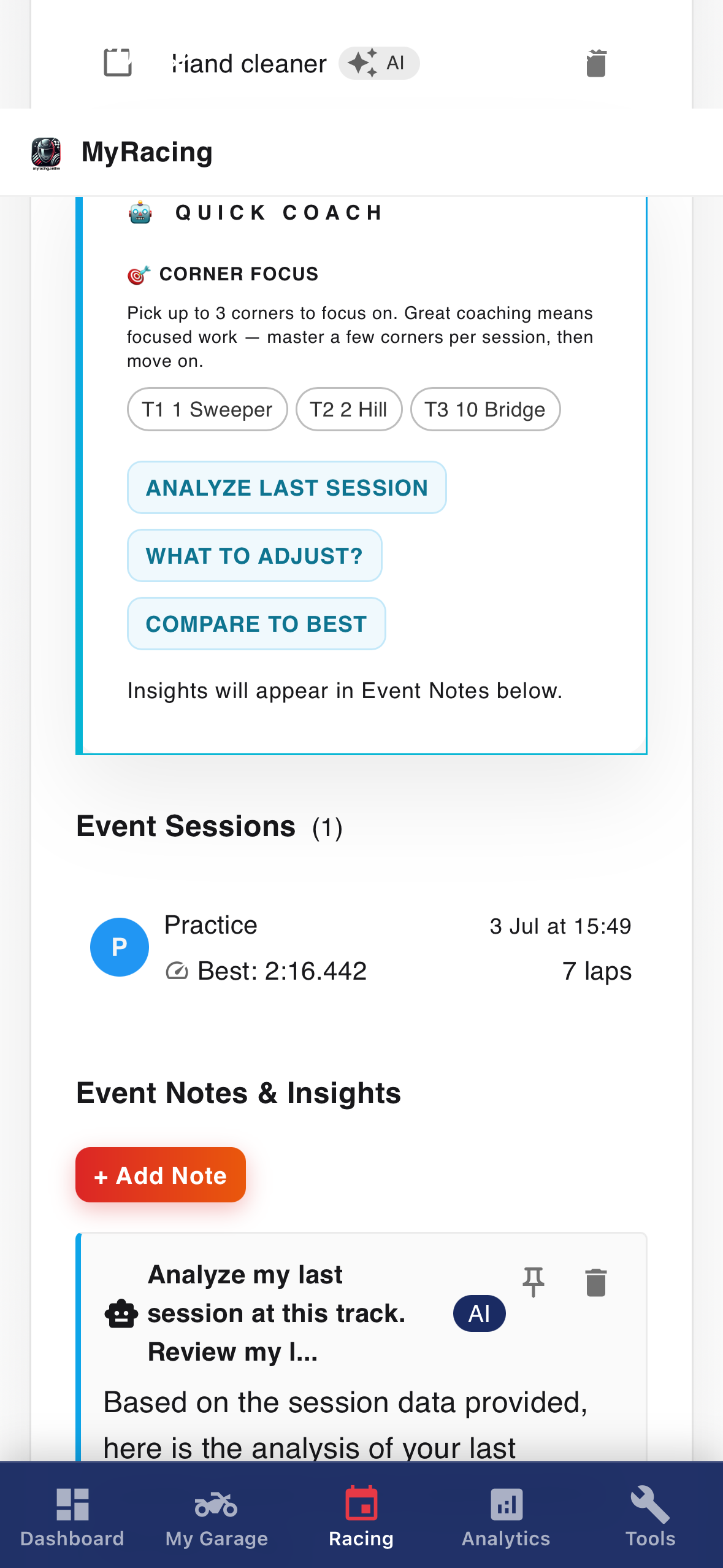
Events — corner notes
Events

Your race weekend, organised end-to-end.

Plan your season, build each weekend, and keep every session, lap and note for the circuit in one place, from the first entry to the debrief.

Season planning: every event you're running, mapped out in one place.

Your track record, right there: open an event and your history at that circuit is waiting: sessions, lap times, PBs, corner notes and the grip forecast.

The Event Hub: organise the weekend, work through your checklist and log sessions while you are at the track.

PROWITH RIDER PRO€4.59/month

AI Racing Coach in the Event Hub: discuss preparation before the event, review sessions during it and work through a debrief afterwards using the relevant records.

AI-generated checklist suggestions for the weekend ahead.

Event Hub includes event organisation, a basic checklist and session logging on Free. Rider Pro adds AI-generated checklist suggestions and AI Racing Coach support before, during and after the event.

Tracks

Every circuit you ride, fully kept.

Your corner notes, your map, the official circuit data and the grip forecast, plus every session you've logged there, all attached to the track.

Official FIM circuits and your own: start from homologated circuit data, or add any track that isn't listed with your own details.

Your corner notes and track map: braking points, entry, apex, exit in your own words, with the track map you link in. Print them with your performance summary for the pit wall.

Weather and grip forecast: hourly conditions per circuit (air temperature, rain, track wetness, grip prediction). Available from around two weeks out and updated as the date nears; at the track you see the current hour plus the hours ahead.

Your history at the track: every session, bike, tyre and best lap you've logged there stays attached to the circuit, so you can pull a session from two years ago and compare it to today.

PROWITH RIDER PRO€4.59/month

Your track progress: lap-time progression and performance analytics across all your sessions at a circuit.
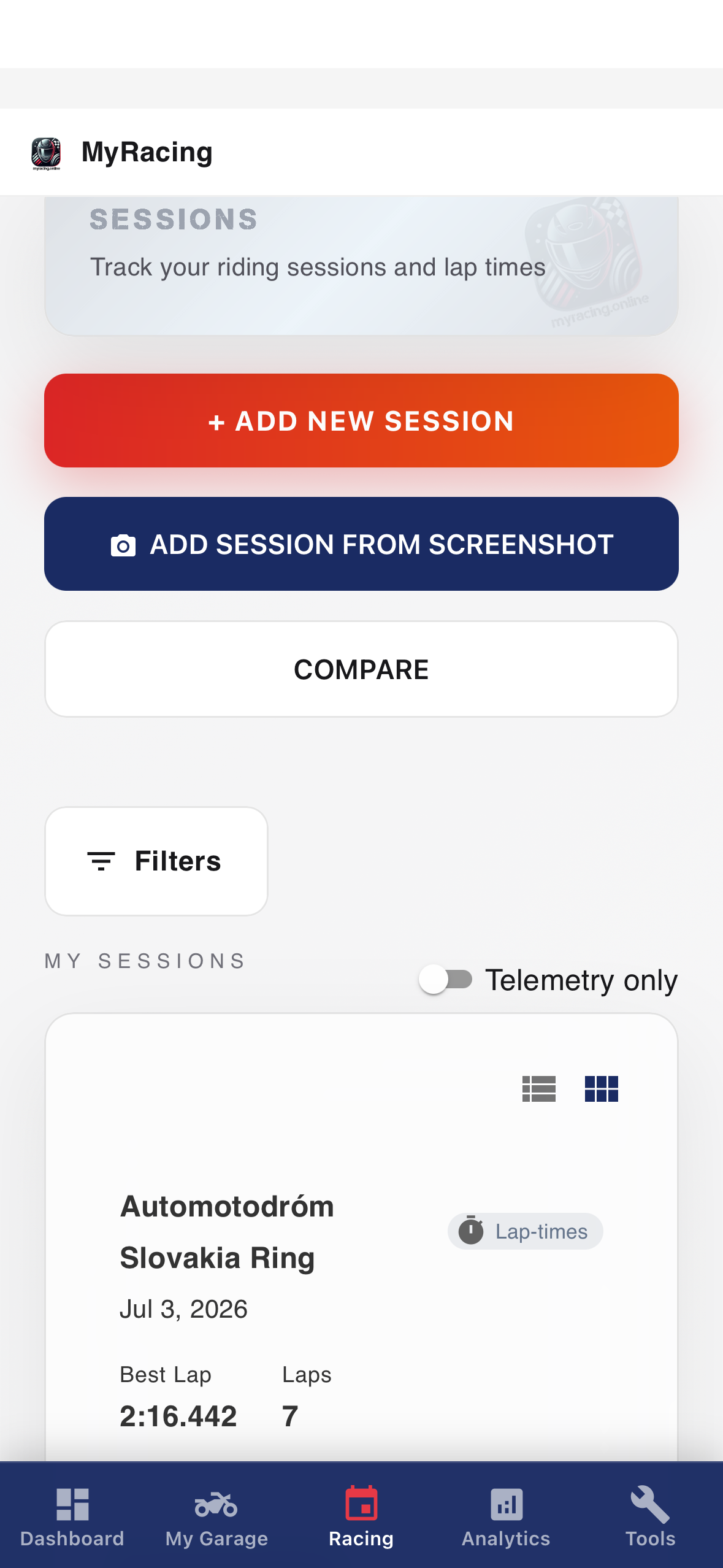
MyRacing sessions
Sessions

Get every session in, then make it tell you something.

Log it however suits. Each session becomes a record you can break down and compare.

Log it your way: type your laps in, upload a timing file (format auto-recognised), or drop a screenshot and it reads the laps off the image.

The full record: setup, tyres with their age in laps/km, pressures, weather and notes, plus best, average, slowest, std deviation and a lap chart. Compare up to three sessions.

PROWITH RIDER PRO€4.59/month

Analytics tab: lap progression with the gap to your best each lap, a consistency score graded for your session type and conditions, lap-time distribution, outlier handling and detailed stats.

AI session analysis: discuss the saved session and its context with AI Racing Coach. Use the telemetry views separately to inspect recorded channels and lap differences.

PULSENEW · RECORD IT LIVE

Record a session with Pulse. Use the telemetry recorder on your motorcycle for your line, speed, lean and lap times. Compatible equipment can add external GPS, ECU channels or heart rate; the available data and recording rate depend on your setup.

The recorded session becomes available for telemetry analysis in Rider Pro. See the full Pulse system →

Rider Journal

Review your season before your next track day.

Bring lap times published by timing services such as MYLAPS Speedhive or Rehm/RaceNova into MyRacing. You can also import supported lap-time PDFs, including selected reports from the Bike Promotion archive, then review your pace and consistency.

You can start with previous events as soon as you join, even if your next track day is months away. Rider Journal works without Pulse.

Available years and details depend on the published results.

Read the Rider Journal article →
Onboard Studio

See exactly where the time went.

Load two onboards, sync them up, and watch the difference unfold corner by corner, frame by frame. Right in your browser, nothing to install.

Side-by-side comparison: drop in any two onboards, scrub each independently, step frame by frame, and run 0.1x to 2x speed.

Fully private: your videos play locally and never leave your device. No upload, no account, any footage from any camera.

PROWITH RIDER PRO€4.59/month

Wait For Me: mark matching references in both videos to measure split differences and follow the cumulative gap.

Synced replay: both laps aligned and played back corner by corner, automatically.

Basic video comparison is free and runs locally in your browser. Rider Pro adds split timing and synced replay; measurement depends on the references you select.

Tyres NEW

Know exactly what's on the bike and what it's done.

Every tyre tracked by its real compound and spec, with usage counted for you.

Official catalogues and automatic usage: pick the exact compound and spec from official manufacturer catalogues, each with a unique ID. Usage counts itself with every session: laps, distance and conditions per tyre, no manual logging.

Pressure windows: manufacturer cold and hot pressure windows, warmer rules and compound ranges, for the exact tyre and size you run.

Tyre Selection Wizard: recommendations based on track, weather and riding style.

Temperature chart: log and chart your tyre temperatures across a session.

PROWITH RIDER PRO€4.59/month

Pressure calculator: work with pressure guidance and your recorded measurements to prepare a cold setting for the conditions.

Tyre performance analytics: review pace and usage through the tyre’s recorded life, with the sessions and conditions needed to interpret changes.
MyRacing setups
Setups

The setups that work, saved properly.

Every setup you run, kept with the results behind it. Easy to compare, easy to share.

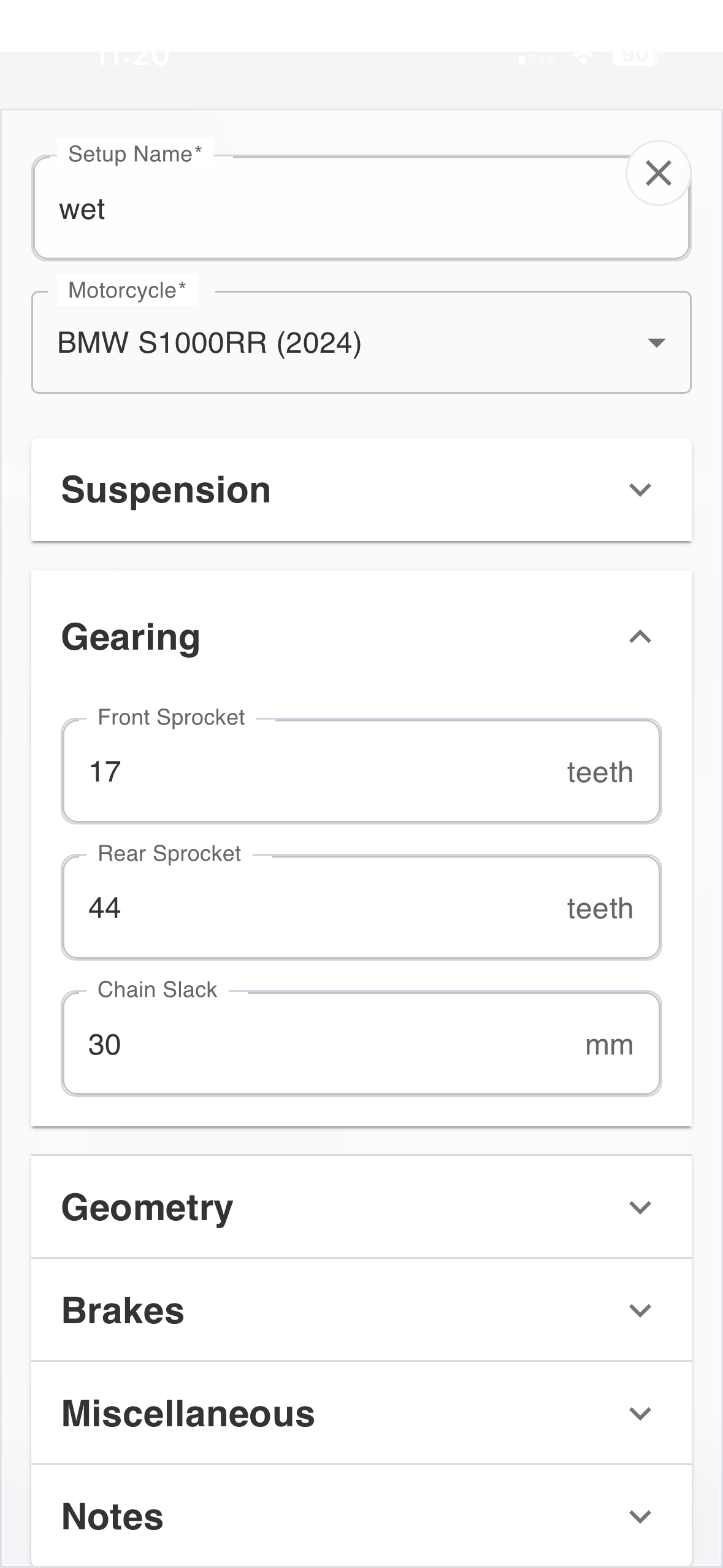
Setup Archive: save complete setups (suspension, geometry, electronics, gearing) linked to the sessions and conditions where you ran them. When something works, it stays in the system with the results behind it.

Gearing analysis: compare current and proposed sprocket combinations with calculated speed/RPM charts for each gear.

Compare setups: view configurations side by side to see which settings changed, then review the sessions and conditions in which they were used.

PROWITH RIDER PRO€4.59/month

Collaborate with your mechanic: share setups so you're both working from the same data (more in the Pro section).
MyRacing garage — bike profile and maintenance
Garage

Everything about your bike, in one place.

Your motorcycle, its parts and service history, all linked to the sessions where they ran.

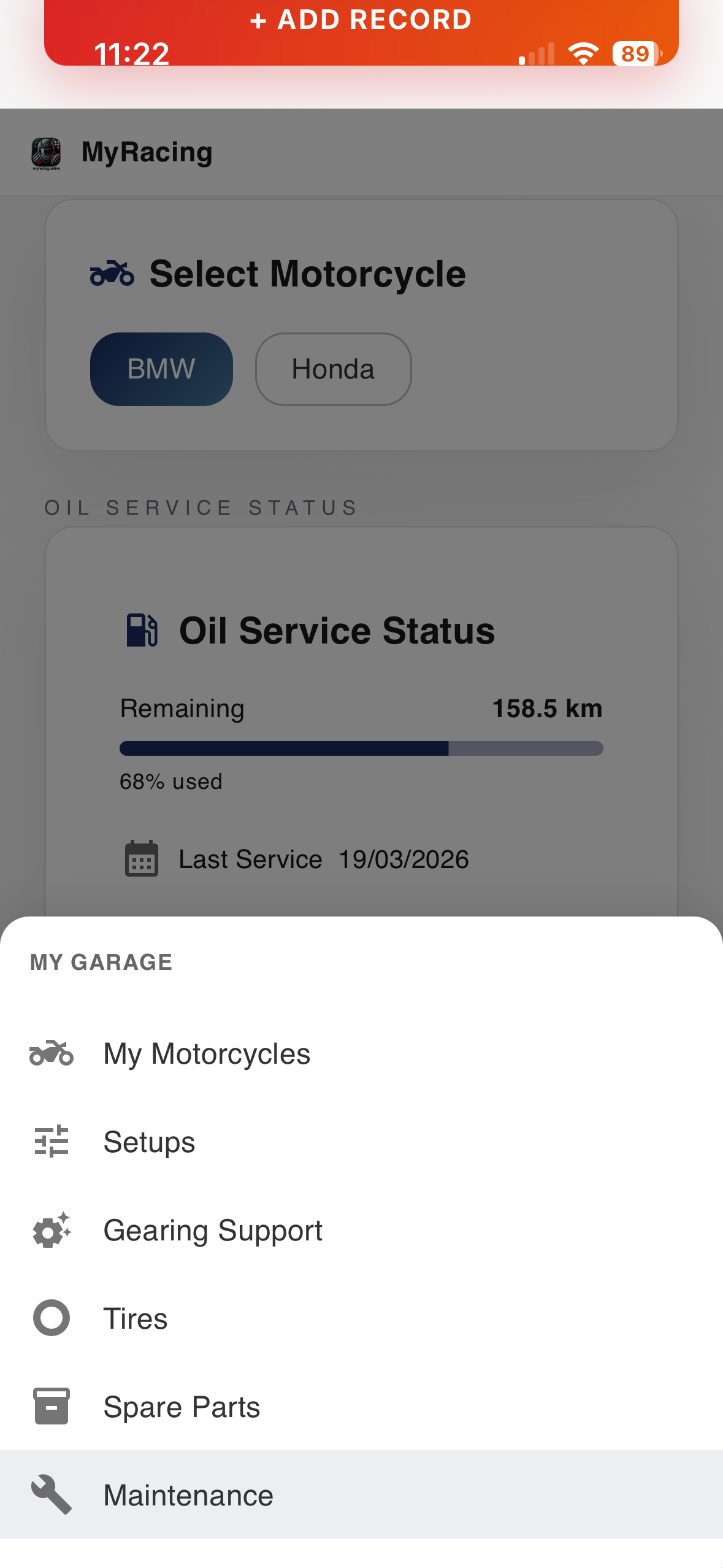
Your motorcycle: full profile (specifications, suspension details, component history), linked to the sessions where each configuration ran.

Maintenance: service records with cost tracking and reminders, connected to your session data so you always know what's been done and what's due.

Spare parts inventory: your parts with stock levels, usage history and where they live in the garage.

PROWITH RIDER PRO€4.59/month

Unlimited motorcycles, setups, tyres and parts (Free covers one bike).

Share your garage with your mechanic: they see the same inventory and service history and work from your data (more in the Pro section).

Get started
Our story
About MyRacing

"The riders who improve fastest aren't always the most talented. They're the ones who understand what's happening on their bike and why. Every feature in MyRacing is built around giving you exactly that understanding."

— Filip, MyRacing Founder

10+
Years racing
500+
Track days
50+
Motorcycles tested
The people behind MyRacing
MyRacing Desktop & Mobile
Your racing, on every screen.

Register once and MyRacing is there for you everywhere: the full web app on your desktop for the deep work, the iOS and Android apps in your pocket for trackside. Log a session the moment you're off the bike, check tyre readiness in the garage, ask the coach between runs. Same account, same data, wherever you are.

Made for trackside.

Log laps, check tyres and ask the coach without leaving the paddock.

One account, every device.

Desktop web, mobile web, native iOS and Android — everything stays in sync.

Choose your plan
Plans & Pricing.

Start with the Free plan to organise your riding. Rider Pro adds analytics, Pulse telemetry, Coach and mechanic collaboration. Your mechanic uses a separate free account.

Rider plansMechanic
Rider Free
Free

Your racing, organised and connected.

You should choose FREE if you:

  • Are getting started with track days or ride occasionally
  • Have one motorcycle and want to keep your data organised
  • Want to explore MyRacing before committing to Pro
  • Need session tracking, maintenance logs and setup storage at no cost

What you get: The complete MyRacing foundation — sessions, setups, tyres, maintenance, tracks and events, all connected around one bike. Everything you need to build a serious picture of your racing, at no cost.

Full Plans comparison →
Most popular
Rider Pro
€4.59/mo

Monthly subscription.

Analyse your riding and prepare for the next session.

Works with MyRacing Pulse

You should choose RIDER PRO if you:

  • Ride more than one bike or run different configurations across the season
  • Race competitively and want to investigate your pace and consistency
  • Ride with Pulse and want to replay the recording, compare laps and examine differences through each corner
  • Work with a mechanic and need your data and setups shared properly
  • Want analytics that connect your sessions, setups, tyres and conditions into something meaningful
  • Want to discuss preparation and progress with an AI coach using the relevant records in your account
  • Want to review progress across sessions and seasons
  • Want your training and race week to follow your race calendar, not a generic plan
  • Need to export data for sponsors, racing clubs or your own records

What you get: Unlimited motorcycles, setups, tyres and parts; analytics across sessions and seasons; AI Racing Coach in eight contexts; mechanic collaboration and data export. Pulse recording and telemetry analysis are included in the same Rider Pro plan. Race Ready supports preparation around your calendar, and Onboard Studio adds video timing and synced replay.

Full Plans comparison →
Rider Pro Annual
€45.99/yr

Save €9.09 compared with twelve monthly payments.

Rider Pro for a full year.

Works with MyRacing Pulse

You should choose PRO ANNUAL if you:

  • Want all the Pro features with one annual payment
  • Want priority support
  • Want early access to new features as they land

What you get: Everything in Rider Pro, plus priority support and early access to new features as they land.

Full Plans comparison →
Mechanic Plan
Free forever

A free workspace for the motorcycles and riders you look after.

You should choose MECHANIC if you:

  • Work with multiple riders or racing teams
  • Need to view and manage rider data based on permissions they grant
  • Want to create, recommend and compare setups for your riders
  • Need a consolidated view of spare parts across all your riders before race weekends
  • Want your own independent inventory and workspace

What you get: Your own workspace, your own inventory, all your riders in one place. Maintenance records, setups, spare parts across everyone you work with — and a shopping list sorted by urgency before every race weekend. Free, with no trial period.

Frequently asked questions

Rider plans and features
How do I sign up for the PRO Plan?
Click Register, choose your plan (Free, Pro monthly, Pro annual or Mechanic) and you're set. Pick Pro and you go straight to Pro; no need to start on Free and upgrade later.
What's the difference between FREE and RIDER PRO?
Free supports organising one motorcycle, sessions, setups, tyres, maintenance, tracks and events within its entry limits. Rider Pro adds unlimited entries, extended analytics, AI Racing Coach, Race Ready, mechanic collaboration and data export. It also includes Pulse recording and telemetry analysis: replay your line, compare laps in 2D or supported 3D layouts, and examine corners, braking and recorded channels. You can use the platform without Pulse. See the full plan comparison.
What is Race Ready?
Race Ready provides AI-generated training and nutrition planning around your riding calendar. It organises preparation into phases and provides a weekly plan with riding-related conditioning and recovery topics. Rider Pro includes Race Ready and the Training context in AI Racing Coach. Review suggestions against your circumstances before putting them into practice.
What happens to my data if I downgrade from PRO to FREE?
Your data is preserved. You'll only be able to actively use content within FREE limits (1 motorcycle, 5 setups, etc.). Everything else stays stored and becomes accessible again if you re-upgrade.
What can I track for each tyre?
MyRacing keeps a record for each physical tyre, including its specification and recorded use in sessions. You can review laps, distance, conditions and times across that history. Rider Pro adds tyre analytics to help examine changes in pace, with the session context needed to interpret them. See how tyres and setup history help with the next outing.
What does the AI Racing Coach actually do?
AI Racing Coach supports questions in eight contexts: motorcycles, setups, tyres, sessions, tracks, events, progress and training. It uses the records available to the selected context to support the discussion. Telemetry replay, recorded-channel analysis and lap comparisons are separate tools in the session view; Coach responses do not replace checking the actual data and equipment specifications.
What is the Event Hub?
Event Hub organises a track day before, during and after the event. Free includes the event structure, checklist and session logging. Rider Pro adds AI-generated checklist suggestions and AI Racing Coach support for preparation, reviewing sessions during the event and the subsequent debrief.
What's the difference between the session Analytics tab and the Analytics section?
Every session has its own Analytics tab — lap progression, consistency score, lap time distribution and detailed statistics for that session. The Analytics section in the main menu looks across your full history: overview dashboard, track personal bests, tyre performance trends, session comparisons and weather impact. Both are Pro features.
Can I add tracks that aren't in the FIM database?
Yes. Add any circuit manually with your own details and sector splits. Once added it works the same as any FIM circuit — you can log sessions, build corner notes, track your progress there and print your performance summary.
What are Corner Notes?
Corner notes are your own annotations for any track — braking points, entry, apex, exit — built corner by corner based on your own experience. Once done you can print them alongside your performance summary at that circuit and take them to the pit wall.
Rider Journal
Do I need a Pulse recording to use Rider Journal?
No. Rider Journal imports officially published lap histories from supported sources. You can bring in an earlier season and review its pace before your next event, including rides you never recorded with Pulse. Read about using your earlier results.
Which results sources does Rider Journal support?
Sources include MYLAPS Speedhive, Rehm/RaceNova, ontime.bike, FP1 Laps, available CR Moto events and selected lap-time PDFs, including reports from the Bike Promotion archive. Searchable years, details and supported formats depend on the provider. Check the sources and availability section in Journal for current coverage.
Why did the search not find my results?
Check the year, event country and the name used in the publication. The country is where the event took place. Try another spelling, all supported catalogues or a direct results link. Catalogue coverage or access to the publication can also limit results.
Can I upload any results PDF?
The report must contain individual lap histories in a supported layout. A classification with positions and best times alone is not enough. The maximum PDF size is 16 MB.
How do I know a Journal import succeeded?
The result shows a save confirmation and the number of histories and lap entries saved. They are then available in your archive. If nothing was saved, a separate message explains what needs checking.
Do I need to refresh immediately after importing?
No. Import already saves the results. Use Refresh saved results when you want to check whether the provider has published changes or additional data.
What if I already have a Pulse session from that day and track?
The publication is kept as a history-only Journal entry without adding another session to MyRacing statistics. Pulse data remains intact. Journal does not automatically match individual published laps to laps in the Pulse recording.
What if I already have a similar manual session?
Journal highlights the potential match. Check the existing entry before importing; creating a separate session for a possible duplicate requires confirmation. The same day and track can include several different outings.
Will importing the same result twice create a duplicate?
Reimporting the same recognised source record updates its existing history. Results from another source or published under another identity may need further checking.
Does one published history mean one outing on track?
Not necessarily. A provider may combine several outings or a full day into one history. Any inferred split into outings is labelled as estimated and does not establish a match with Pulse sessions.
Why are more entries saved than used in pace analysis?
The archive also keeps missing times, pit entries and other excluded records. The best lap, median and pace chart use eligible laps. Excluding an entry from analysis does not delete it.
What do the best lap and median show?
The best lap is the quickest eligible lap in the analysis. The median is the middle of the analysed lap times, helping you judge typical pace alongside a single best result.
What is the theoretical best lap in Journal?
It combines the best eligible sector times available in the publication. It shows a calculated potential from those sectors, not a lap you actually completed.
Why are sector times missing?
The publication may not contain sectors, or its data may be incomplete. Journal keeps the information available and explains when sector bests or a theoretical best cannot be calculated.
What does the 600-second pace threshold mean?
Lap times longer than ten minutes are excluded from pace analysis because they may include a break. All entries remain saved. You can change the threshold and apply it with Save pace settings.
Where does Journal weather come from?
It uses hourly historical weather model data. The track location, date, time zone and riding times are needed; if the source has no times, you can confirm the actual interval. It does not measure asphalt temperature or establish whether the track surface was wet or dry.
Does Journal reconstruct GPS, braking, lean, OBD or heart rate?
No. Journal imports information published by the timing source. Telemetry captured by Pulse stays in the Pulse session.
Are automatic publication checks live timing?
No. They check whether the provider has published new or changed results. They do not receive each lap live.
Does a failed refresh mean my import was lost?
Previously saved histories remain available. The message identifies the failed operation and anything that needs correcting. A later refresh or settings failure does not require you to repeat a successful import.
What does a Journal backup include?
A copy contains the selected Journal entry, its histories and available associated information. It does not contain your entire MyRacing account or full Pulse telemetry.
Who can see my Journal archive?
It belongs to your account. Importing results does not automatically share the archive with other users, a mechanic or a team.
Mechanic Plan
Is the mechanic plan really free forever?
Yes. The free Mechanic account has its own parts inventory and rider connections, with no trial period. It can be used independently; connecting a Rider Pro account adds access to the records and permissions that rider shares.
How does a mechanic connect with riders and what can they access?
Invite riders by email or accept their invitations. Each rider controls what they share — motorcycle details, setups, maintenance records, session history, spare parts and event calendar are all possible, depending on the permissions they grant. You manage all your connections from one dashboard and can archive inactive riders to keep things organised.
Can a mechanic make changes to rider data and use their own parts?
When a rider enables edit permissions you can update their motorcycle details, create and recommend setups, compare up to four side by side, and add maintenance records. When logging a service you can use parts from your own inventory or deduct from the rider's. You cannot delete rider-created data.
Updates
News & Release Notes
Loading updates…
Get in touch
Contact & Support
Email Supportsupport@myracing.online Instagram@myracingonline FacebookMyMotoRacing LinkedInMyRacingOnline